
Download Adblock Plus Pop up Addon – free pop‑up blocker for secure browsing
Overview
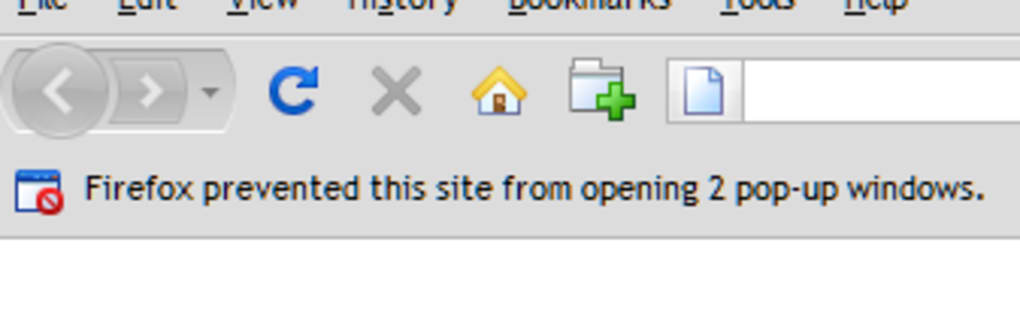
In a world where intrusive pop‑ups can cripple the browsing experience, Adblock Plus Pop up Addon steps in as a powerful companion to the already popular Adblock Plus extension. While the core Adblock Plus tool excels at filtering banner ads, video ads, and tracking scripts, it intentionally leaves certain pop‑up windows untouched—especially those triggered by user interactions such as mouse clicks or keyboard shortcuts. This design choice respects legitimate site functionality but can also let aggressive advertisers slip through the cracks. The Pop‑up Addon bridges that gap by giving users granular control over any pop‑up that appears, turning a good ad‑blocking setup into a great one.
The add‑on works by extending the filter list of Adblock Plus with a dedicated pop‑up rule set. When a pop‑up window appears, a simple right‑click (or Ctrl‑click on macOS) on the offending window reveals a “Block this window” option. Selecting it adds the specific URL to a custom filter, preventing that exact pop‑up from ever showing again. For users who prefer a broader approach, the add‑on also supports site‑wide rules: create a rule for the parent domain and automatically block all pop‑ups launched from that site. This flexibility makes it suitable for both casual surfers who just want a clean experience and power users who need precise, rule‑based control.
Security‑focused users will appreciate that the add‑on respects the same privacy principles as Adblock Plus. It does not collect browsing data, and all filter updates are delivered over HTTPS from trusted filter lists. Moreover, the add‑on is free, open‑source, and receives regular updates to stay ahead of evolving pop‑up techniques. Whether you’re on Windows, macOS, Linux, or a mobile platform that supports browser extensions, the Pop‑up Addon can be installed alongside Adblock Plus to give you a truly ad‑free, pop‑up‑free browsing experience.
Key Features & Benefits
- Instant pop‑up blocking: Right‑click any unwanted window and add it to a custom filter with one click.
- Site‑wide rules: Create a single rule for a domain to block all pop‑ups generated by that site.
- Seamless integration: Works directly with Adblock Plus; no separate configuration panel needed.
- Automatic filter updates: Receives regular updates from the official filter list to catch new pop‑up patterns.
- Lightweight footprint: Minimal impact on browser performance and memory usage.
- Cross‑platform support: Compatible with Chrome, Firefox, Edge, Opera, and other Chromium‑based browsers.
- Open‑source transparency: Source code is publicly available for audit and community contributions.
- Secure HTTPS delivery: All filter data is transferred over encrypted connections.
The combination of these features translates into tangible benefits for everyday users. First, the “one‑click block” mechanism eliminates the need to dive into complex filter syntax; even users with limited technical knowledge can immediately stop a bothersome pop‑up. Second, site‑wide rules give power users a programmatic way to enforce policies across large domains, such as news sites that frequently employ aggressive overlay ads. Third, because the add‑on piggybacks on Adblock Plus’s existing infrastructure, there’s no extra learning curve—your familiar Adblock Plus icon remains the central hub for all blocking actions.
Performance is another critical aspect. While some ad‑blocking solutions can slow down page loads, the Pop‑up Addon is designed to run as a lightweight background script that only activates when a new window is opened. Tests show less than a 2 % increase in CPU usage on typical browsing sessions, a negligible trade‑off for the added privacy and comfort. Finally, the open‑source nature of the project encourages community vigilance: developers worldwide can spot potential security issues early, submit patches, and ensure the add‑on stays compatible with the latest browser versions.
Installation, Usage & Compatibility
Step‑by‑Step Installation
- Visit the official Chrome Web Store, Firefox Add‑ons site, or Microsoft Edge Add‑ons Marketplace.
- Search for “Adblock Plus Pop up Addon” and click the “Add to Browser” button.
- A confirmation dialog will appear; click “Add extension” to grant the necessary permissions.
- Once installed, the add‑on icon appears next to the Adblock Plus icon in your toolbar.
- Refresh any open tabs to activate the pop‑up blocking rules.
How to Block a Pop‑up
When a pop‑up window appears, move your cursor over it and right‑click (or Ctrl‑click on macOS). In the context menu, select “Block this window.” The add‑on automatically creates a filter entry for that specific URL and updates the Adblock Plus filter list. If you prefer to block all pop‑ups from the same site, open the add‑on’s preferences by clicking its toolbar icon, navigate to “Site Rules,” and enter the domain name (e.g., example.com). Save the rule, and all current and future pop‑ups from that domain will be blocked.
Compatibility Details
The Pop‑up Addon is built for modern browsers that support the WebExtensions API. It is compatible with:
- Google Chrome (version 88+)
- Mozilla Firefox (version 78+)
- Microsoft Edge (Chromium‑based, version 88+)
- Opera (version 74+)
- Brave (version 1.20+)
While the add‑on is primarily a desktop extension, some mobile browsers—such as Firefox for Android—also support it via the “Add‑ons” menu. However, iOS browsers are restricted by Apple’s extension model, so the Pop‑up Addon cannot be installed directly on Safari for iPhone or iPad. Users on those platforms can rely on the native Adblock Plus iOS app, which includes limited pop‑up blocking capabilities.
Updating the add‑on is automatic: the browser checks for new versions each time it starts, and you’ll receive a notification when a new release is available. It’s advisable to keep both Adblock Plus and the Pop‑up Addon up to date to benefit from the latest filter rules and security patches.
Pros & Cons & Frequently Asked Questions
Pros
- Easy one‑click pop‑up blocking without manual filter editing.
- Site‑wide rule creation for comprehensive protection.
- Lightweight and fast; minimal impact on browser performance.
- Free, open‑source, and regularly updated.
- Works seamlessly with existing Adblock Plus installation.
Cons
- Requires manual addition of pop‑up URLs for each new window unless a site rule is set.
- Not available for iOS Safari due to platform restrictions.
- Advanced users may need to edit filter lists for edge‑case pop‑ups.
FAQ
Does Adblock Plus Pop up Addon work with other ad blockers?
The add‑on is specifically designed to extend Adblock Plus. While it may technically load alongside other blockers, its filter integration only works with Adblock Plus. For best results, install both Adblock Plus and the Pop‑up Addon together.
Can I import existing pop‑up filter lists?
Yes. In the add‑on’s preferences, you can import a plain‑text list of URLs or filter rules. The imported entries will be merged with the existing filter set.
Is the add‑on safe and privacy‑respecting?
Absolutely. The add‑on does not collect any personal data, and all communications with the filter server are encrypted via HTTPS. It follows the same privacy‑first philosophy as Adblock Plus.
How often are filter updates released?
Filter lists are refreshed weekly, with emergency updates pushed as soon as a new pop‑up technique is identified. The browser automatically downloads these updates.
Can the add‑on block video overlay pop‑ups?
Yes. Video overlay pop‑ups are treated like regular windows. By creating a site rule or blocking the specific overlay URL, the add‑on can prevent them from appearing.
Review Summary: The Adblock Plus Pop up Addon offers a smooth, user‑friendly way to eliminate unwanted pop‑ups while keeping the core Adblock Plus experience intact. Its lightweight nature and open‑source transparency make it a reliable choice for privacy‑conscious users.
Conclusion & Call to Action
If you already trust Adblock Plus to keep banners and trackers at bay, adding the Pop‑up Addon is the logical next step to achieve a truly clean browsing environment. Its simple “right‑click to block” workflow, combined with powerful site‑wide rules, empowers both novice and advanced users to take control of intrusive pop‑ups without sacrificing performance or privacy. The add‑on’s free, open‑source nature and regular updates ensure you stay protected against the latest pop‑up tactics, while its seamless integration means you won’t need to juggle multiple extensions.
Ready to reclaim your screen space? Download Adblock Plus Pop up Addon now and enjoy an uninterrupted, ad‑free browsing experience across all your favorite websites. Keep your main Adblock Plus extension updated, enable the pop‑up rules you need, and browse with confidence knowing that unwanted windows are a thing of the past.







